Skip to content
JOYMODE Business Solutions

Managed Technology · Managed IT Services

Managed technology for the way your business actually operates.

Helpdesk, users, devices, networks, cloud, cybersecurity, communications, vendors and business systems — managed as one environment, with local onsite support when remote support isn't enough.

Managed customers receive extended helpdesk and emergency response 24/7/365.

Explore Managed Services

The short answer

IT support is the baseline.

Short answer

What does JOYMODE manage?

The whole operating environment: helpdesk and users, devices, networks and sites, cloud and identity, cybersecurity, backup and continuity, remote and field technology, communications and telecom, business applications and vendors — plus the strategy that ties them together.

Short answer

What makes it different?

JOYMODE also helps plan, secure, standardize and improve what comes next — with local onsite technicians, physical infrastructure capability, telecom management, custom integrations, and strategic AI available from the same team.

01 · Managed

Helpdesk & User Operations

A clear place to send every issue, handled remotely when that's fastest and onsite when it isn't.

Explore Helpdesk & User Operations
  • Remote and onsite support
  • User troubleshooting
  • Printers, scanners, and plotters
  • SaaS and vendor escalation
  • Onboarding and offboarding
  • Account and access issues
  • Remote employees and mobile users
02 · Managed

Endpoint & Device Lifecycle

Business devices standardized, managed, secured, and replaced on a plan instead of when they fail.

  • Business device standards
  • Procurement and deployment coordination
  • RMM / MDM management
  • Patching and software maintenance
  • Endpoint security
  • Asset inventory and warranty tracking
  • Refresh planning and lifecycle budgeting
  • Secure retirement and replacement
  1. 01

    Plan

  2. 02

    Procure

  3. 03

    Configure

  4. 04

    Deploy

  5. 05

    Manage

  6. 06

    Secure

  7. 07

    Refresh

  8. 08

    Retire

03 · Managed

Network & Site Operations

Firewalls, switching, Wi-Fi, and Internet managed as operating infrastructure across every site.

Explore Network & Site Operations
  • Firewalls and switching
  • Business Wi-Fi
  • WAN / Internet and backup failover
  • Segmentation
  • Firmware and patch lifecycle
  • Network monitoring and remote management
  • Connectivity troubleshooting
  • Multi-site standards
  • Remote jobsites and temporary locations where applicable
04 · Managed

Cloud, Identity & Access

Who can access what — and the accounts, licenses, and files behind it — governed from hire to departure.

Explore Cloud, Identity & Access
  • Microsoft 365 administration
  • Google Workspace environments where appropriate
  • Identity and account administration
  • MFA and access permissions
  • Licensing
  • SSO and secure access where appropriate
  • Collaboration and file services
  • User lifecycle governance
05 · Managed

Cybersecurity

Layered protection across identity, endpoints, email, people, network, and data — scoped to the business.

Explore Cybersecurity
  • Endpoint security and managed threat detection
  • Email security and phishing defense
  • Security Awareness Training and simulated phishing
  • DNS security
  • Identity protection, MFA, and least privilege
  • Application control
  • Password and credential security
  • Secure remote access
  • Incident coordination
  • Cyber-insurance requirement support where appropriate
06 · Managed

Backup, Recovery & Continuity

Backups that are validated, recovery that is planned, and connectivity that has a second path.

Explore Backup, Recovery & Continuity
  • Workstation, server, and NAS continuity where applicable
  • Active BCDR
  • Microsoft 365 cloud-to-cloud backup
  • Backup validation
  • Restore and recovery planning
  • Internet redundancy
  • Business continuity planning
07 · Managed

Remote Workforce & Field Technology

Support that follows people to home offices, vehicles, jobsites, and temporary locations.

  • Remote staff and mobile devices
  • Secure access and home-office dependencies
  • Jobsite and temporary office networks
  • Cellular and multi-carrier connectivity
  • Starlink where appropriate
  • Portable, rapid-deployment connectivity
  • Local field dispatch when remote support can't resolve it
08 · Managed

Communications & Telecom

Know what you're paying for, what it's supporting, and who owns it.

Explore Communications & Telecom
  • Cloud voice, Microsoft Teams, and Zoom
  • Yealink and supported endpoint devices
  • Call routing and business messaging where supported
  • ISP and carrier coordination
  • Circuit inventory and outage escalation
  • License and seat review
  • Telecom and ISP expense management
  • Renewal tracking and right-sizing
  • New-location carrier procurement
  • Demarc and infrastructure coordination
09 · Managed

Business Applications & Vendor Operations

The SaaS platforms and vendors the business depends on — documented, administered, and escalated.

  • SaaS account administration
  • User access
  • Vendor escalation and coordination
  • Application dependencies and ownership documentation
  • Licensing
  • Integration support
  • Business-system lifecycle
10 · Managed

Technology Strategy & Lifecycle

IT support is the baseline. We also help plan, secure, standardize, and improve what comes next.

  • Technology roadmaps and standards
  • Budgeting and refresh cycles
  • Licensing and vendor rationalization
  • Documentation
  • Multi-location expansion planning
  • Risk and dependency identification
  • Recurring technology reviews

Strategic AI, Automation & Integrations

Make AI useful to the business.

A first-class JOYMODE practice: moving from experimenting with AI to governed systems connected to the workflows and information teams actually use.

  1. 01

    Discover

  2. 02

    Design

  3. 03

    Connect

  4. 04

    Build

  5. 05

    Govern

  6. 06

    Operate

Explore AI, Automation & Integrations

Taking over an existing environment

No rip-and-replace required.

JOYMODE can inherit an environment from another provider or an internal team, understand what works, document it, secure it, standardize it, then improve it over time.

  1. 01

    Assess

    Review users, devices, networks, accounts, vendors, and what already works.

  2. 02

    Transition

    Collect credentials and access, coordinate with the outgoing provider, and avoid disruption.

  3. 03

    Document

    Record assets, accounts, network layout, vendors, licenses, and dependencies.

  4. 04

    Secure

    Close the highest-priority gaps first: MFA, admin access, backups, endpoint protection.

  5. 05

    Standardize

    Bring devices, configurations, and processes onto consistent, supportable standards.

  6. 06

    Operate

    Run day-to-day support, monitoring, maintenance, and vendor escalation.

  7. 07

    Improve

    Recurring reviews, roadmaps, and planned upgrades — no forced rip-and-replace.

Local support

Remote when it should be. Onsite when it needs to be.

Most issues are resolved remotely. When the problem is a failed switch, a dead circuit, a jobsite trailer, or a new hire's desk, JOYMODE dispatches local technicians — and because the same team builds networks, cabling, Wi-Fi and security systems, onsite work doesn't stop at the edge of the laptop.

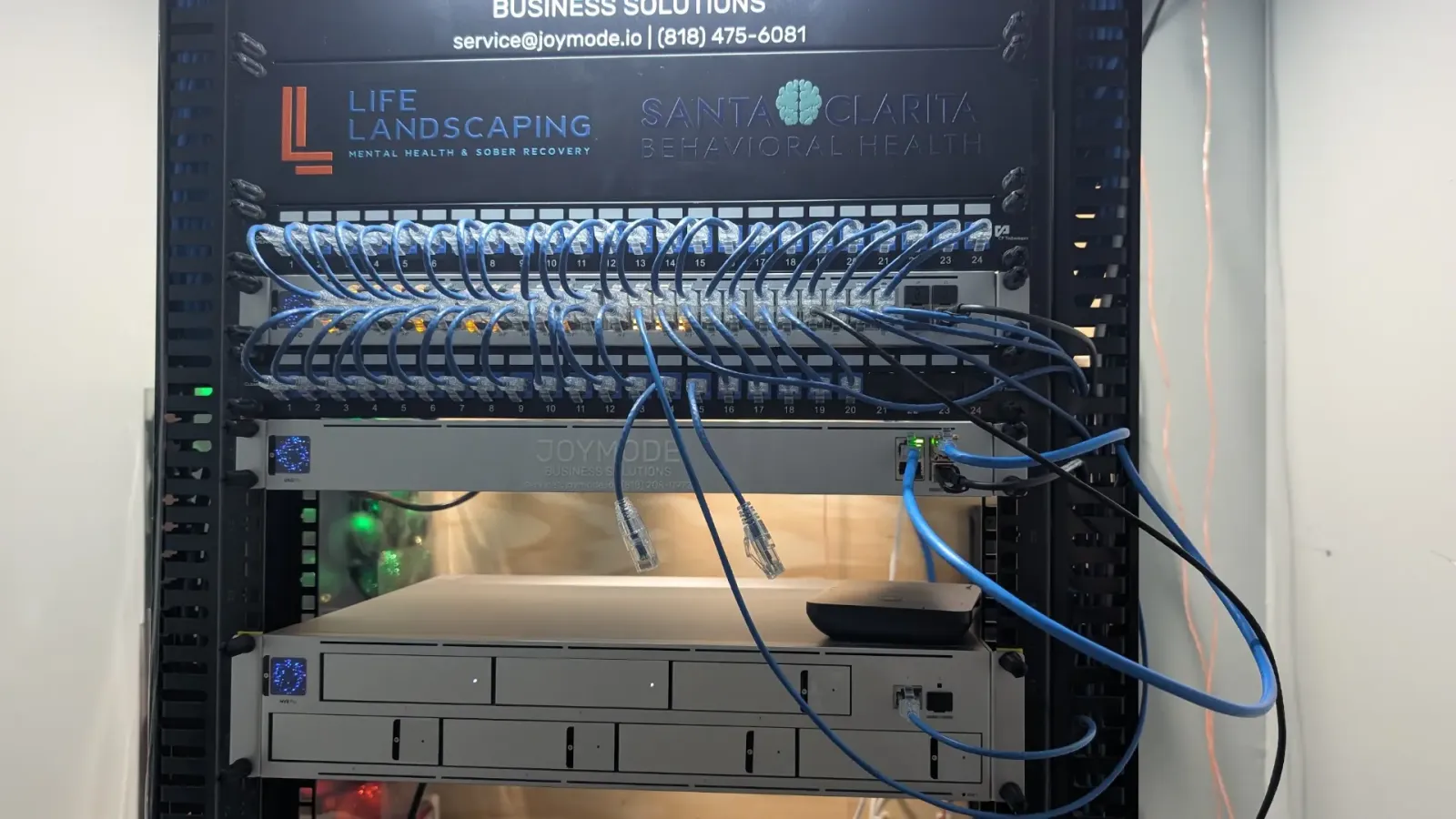
JOYMODE-labeled rack with patch panels, short patch cables to a UniFi switch, gateway, and video recorder

Managed Technology & Security Assessment

Start with a clear picture of the environment.

A structured review of how your technology actually runs today, and a practical plan for what to secure, standardize and improve next.

12 assessment domains

  1. 01Users & identity
  2. 02Devices & lifecycle
  3. 03Networks & connectivity
  4. 04Cloud & collaboration
  5. 05Cybersecurity
  6. 06Backup & recovery
  7. 07Communications & telecom
  8. 08Business applications
  9. 09Vendors & licensing
  10. 10Remote / multi-site operations
  11. 11Documentation
  12. 12AI & automation opportunities

What you receive

  • Current-state overview
  • Critical risks and dependencies
  • Lifecycle priorities
  • Vendor and licensing observations
  • Security priorities
  • Continuity recommendations
  • A practical technology roadmap

The assessment is a business technology review. It is not a penetration test, compliance audit, cyber-insurance certification, or legal review unless separately scoped.

Request an Assessment

Common questions

Managed technology, answered

What does a managed technology provider do?

A managed technology provider takes ongoing responsibility for a business's IT environment: helpdesk, users, devices, networks, cloud accounts, cybersecurity, backup, communications, and vendors. JOYMODE manages these as one environment and adds strategy, lifecycle planning, and local onsite support.

Do you offer 24/7 support?

Managed customers receive extended helpdesk and emergency response 24/7/365. Standard office hours are 8:00 AM – 5:30 PM Pacific, Monday–Friday.

Can JOYMODE take over an environment another provider set up?

Yes. We assess what's in place, transition access carefully, document it, secure the priorities, and standardize over time. We don't require a rip-and-replace to start.

Do you provide onsite support?

Yes. Most issues are resolved remotely, and JOYMODE dispatches technicians locally when remote support isn't enough — across Southern California, with broader California and project-based coverage elsewhere.

Do you only support environments you installed?

No. Our infrastructure background helps, but JOYMODE supports inherited networks, devices, cloud tenants, and vendors as a full managed provider.

How do we get started?

Most engagements begin with a Managed Technology & Security Assessment covering users, devices, networks, cloud, security, backup, communications, vendors, documentation, and AI opportunities, followed by a practical roadmap.

Next step

Talk through what managed technology should look like for you.

We'll review your users, locations, systems, vendors and pain points before proposing anything.